Foothill Connect
Request Help Via Foothill ConnectWho We Are
The Foothill Connect team of Peer and Success Coaches leads the coordination of student retention efforts across campus. We work with all faculty and staff to serve as a main point of contact to student services, so they know where to refer students for support.
Support That Keeps You GoingHow We Can HelpCollege is a lot - especially when you’re balancing classes with work, family, clubs, and everything else life throws your way. Whether you’re feeling overwhelmed, or just want to level up your academic game, the Foothill Connect team is here to help you succeed! |
Your coach is here for you!
Whether your class is online or on campus, our coaches will work with you one-on-one to build a custom game plan for the quarter. Depending on your interests, this can tackle:
- Effective time management habits and tools (calendars, planners, to-do lists)
- Study strategies (note taking, reading, exam prep)
- Canvas tips and tricks
- Creating a catch-up plan for coursework
- Tackling difficult subjects with confidence
- Building a supportive community at Foothill College
Foothill Connect Platform
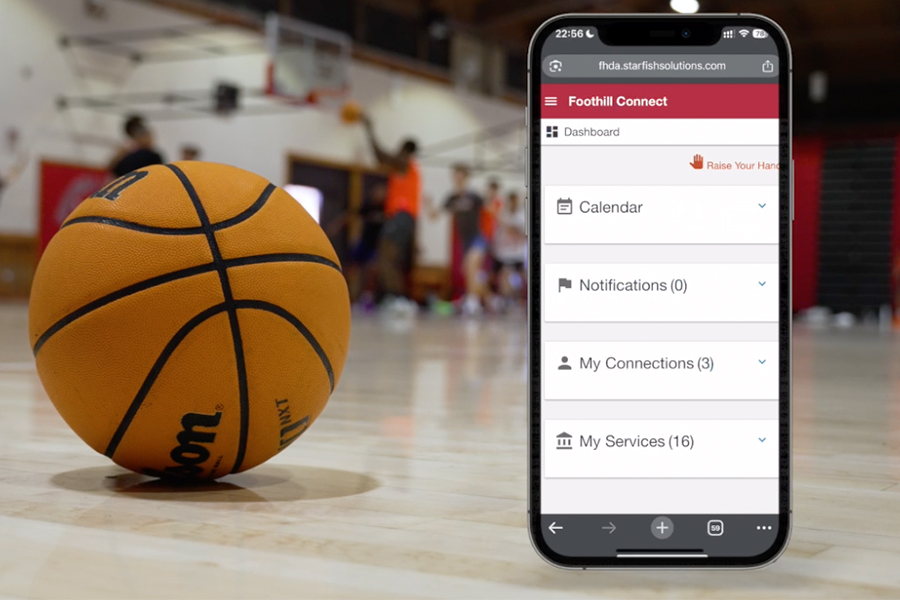
Foothill Connect is located in your My Portal and is an easy way to connect to many services around campus, as well as schedule appointments with the Foothill Connect Success Coach team.
Access Foothill ConnectOne Hub, Every Resource
Not sure who to email or where to go for help? We’ll figure it out with you. Raise your Hand on Foothill Connect, or send us an email and we’ll get you directly connected to campus resources like our: Financial Aid & Scholarship support
- Career and Academic Counseling
- Tutoring
- Mental Health & Wellness Center
Foothill Connect Platform
Foothill Connect—a new platform managed by the Foothill Connect team—is a tool that makes it easier for students to get connected to campus resources. Foothill Connect increases communication between faculty, staff, and student services to maximize students' chances for success.
Key Features of Foothill Connect
Foothill Connect allows faculty to provide timely and direct feedback to students on academic progress in their course(s), while connecting students to campus resources that will help maintain or improve their class standing—all in one online hub!
Students and faculty can also use Foothill Connect to ask questions, submit referrals, or request assistance from a number of campus resources.
Learn more about this new tool by selecting a topic.
- Foothill Connect holds a catalog of important resources that students should know about and engage with during their educational journey here at Foothill.
- Students can use the "I Need a Success Coach" help feature to request information or assistance getting connected. A Success Coach will review the request and connect the student to the appropriate service.
- The system also identifies certain resources and points of support that are most relevant to students based on classes they are actively enrolled in, or programs they belong to--making access to a wide array of support available at a click of the mouse!
Alerts raised in the Foothill Connect system will generate an email/text to the student encouraging them to login to follow up on the tracking item.
Foothill Connect allows users to raise four main alerts:
- Kudos (to recognize good work and effort)
- Flags (to encourage students to meet with their instructors and seek additional support)
- Referrals (to campus resources)
- To-Do's (actionable items to be completed by students)
In Foothill Connect, faculty and staff can enable the appointment feature to set up office hours scheduling for students online.
- Use Foothill Connect to set appointments with a Success Coach!
- Save time emailing back and forth to confirm availability!
- Track cancellations and no-shows, and keep notes on topics covered in your appointments.
- Appointments generate an Outlook meeting invite that populates on work calendars when accepted.
Faculty and Staff
The Foothill Connect team provides Foothill Connect tutorials for faculty and staff in written and video format through Canvas.
For in-person training, please contact Chris Chavez at chavezchris@fhda.edu
How To Use Foothill Connect
The Foothill Connect team provides Foothill Connect tutorials for faculty and staff in written and video format through Canvas.
For in-person training, please contact Chris Chavez at chavezchris@fhda.edu
Please check out this video to learn the basics of how to navigate Foothill Connect.
- To access Foothill Connect, log in to MyPortal, and click on the "Students" tab.
- Scroll down to find the Foothill Connect link on the bottom left side of the page.
Foothill Connect Faculty TrainingTo schedule an individual training, please contact the Foothill Connect Team at 650.949.7852 |
Winter hours (Jan. 5 – Apr. 3) Closed Holidays
Contact Us
Foothill Connect
Student Services Building 8300, Room 8302
foothillconnect@fhda.edu